A prefab is a ready-made piece of gameplay script you drop into your level: an enemy that respawns with loot, an ally that fights beside the player, a kill counter with an objective, a kill volume. Each one is built from the patterns the game's own levels use, with clearly named pins, and each one gets round an engine trap that otherwise only shows up as a crash or a silent failure in game - an ally that fails the level the first time an enemy shoots it, an NPC that crashes the game when it is despawned behind cover, an enemy that respawns right in front of the player.
Prefabs are composite packages (.ocp files) in the Prefabs folder beside OpenCAGE. Inserting one brings its composite into your level (if the level doesn't have it yet) and places an instance of it, which you link up and configure like any other composite instance. After that it's an ordinary composite in your level: open it to see how it works, or change it.
Open the composite you want the prefab in (usually your level's root), then choose Create Entity → Insert Prefab... - from the script editor's Create Entity button, or by right-clicking the flowgraph (the prefab's node then lands where you clicked).
The window lists the prefabs by category. Select one to read what it does, its pins and the trap it avoids. Give the instance a name if you like, then press Insert (or double-click the prefab).
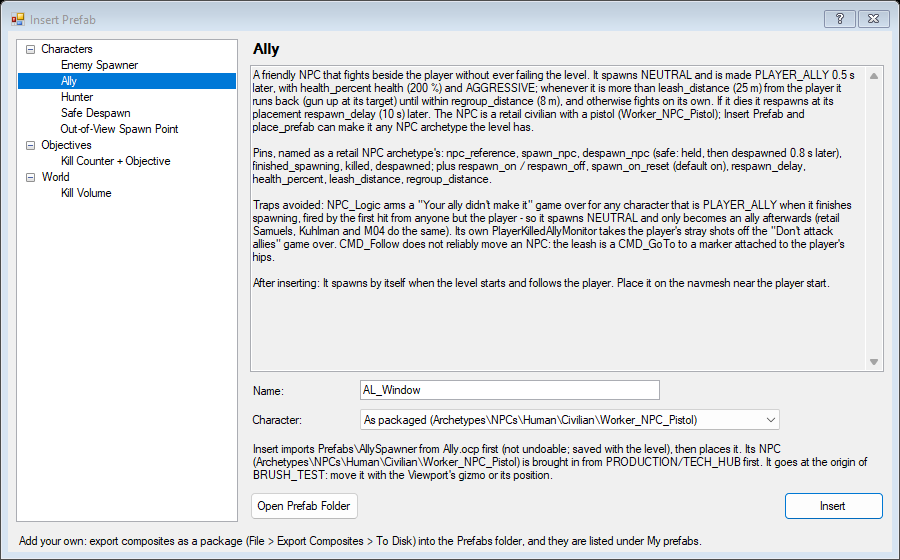
The instance is placed at the origin of the composite: move it with the Viewport's gizmo, or set its position in the inspector. Placing it is one step on the undo history (Insert Prefab: ...). Bringing the prefab's composite into the level the first time is an import, like any composite import, so it can't be undone - the level only keeps it when you save. A Save and Build makes it playable.
The Enemy Spawner and the Ally each place an NPC. By default that is one of the game's own NPCs (a security guard with a pistol, and a civilian with a pistol). Pick another from Character - any NPC archetype your level has, an android say - and OpenCAGE makes a copy of the prefab for it (Prefabs\EnemySpawner_Android_NPC), once, and uses that copy for every placement of that character.
The game's characters are not part of the prefab packages: they are the game's own files. If your level doesn't have the prefab's NPC yet (a new level made with Create Level, say), Insert Prefab offers to bring it in from a level of your install that has it, exactly as Import Composites → From Level would:
Archetypes\NPCs\Human\Security\Grunt_NPC_Pistol from PRODUCTION/SCI_HUB (or SCI_ANDROIDLAB, or TECH_COMMS, if SCI_HUB isn't installed).Archetypes\NPCs\Human\Civilian\Worker_NPC_Pistol from PRODUCTION/TECH_HUB (or SCI_ANDROIDLAB, HAB_AIRPORT or SCI_HUB).That brings the NPC with everything it uses (its weapon, its effects, the parts its look is made from). It loads the other level, so it takes a little while, and like any import it can't be undone: if you change your mind, close the level without saving. The window says before you insert when this will happen.
The Kill Volume lets you set its box size for this placement. It is stored the way the game's own levels store a per-placement change: an alias in your composite overriding the box inside this one instance, so every kill volume can have its own size.
Prefabs talk to the rest of your script through their pins, shown on the instance's node:
start, despawn or add_kill.killed, finished_spawning or goal_reached. Link them to whatever should happen next.respawn_delay or goal. Each placement has its own.character) - which NPC a prefab acts on. Link it to the NPC's npc_reference: an NPC archetype's, or an Enemy Spawner's or Ally's, which have the same pins as the game's own NPCs.Levels saved by an older OpenCAGE could lose composite pins in game (output pins that never fired, input values that read as zero). That's fixed: saving the level puts every composite's pins in the order the game searches them, and the Level Check warns about any that aren't.
A hostile NPC that comes back. It spawns where it's placed when the level starts, carries loot (a medkit by default) that the player can take from its body, and some time after it dies it respawns at its placement - but, unless you turn wait_out_of_view off, only once that spot is out of the camera's view and at least min_distance from the player.
Pins, named as the game's own NPCs name theirs: npc_reference, spawn_npc, despawn_npc (a safe despawn, see below), finished_spawning, killed (a couple of seconds after the death blow), despawned; and dying (the moment it dies - use it for sounds and effects), respawn_on / respawn_off. Settings: spawn_on_reset, respawn_delay (15 s), wait_out_of_view, min_distance (15 m), loot_item (small_medikit) and loot_quantity (1), health_percent (100).
The trap it avoids: the game has room for 18 characters at once, the player included, and a dead body keeps its slot until it is despawned - the 19th character crashes the game. The spawner removes the body before the respawn rather than adding a second character beside it. Loot set only on the NPC is lost when it respawns unless its container is refreshed, which the spawner does on every spawn.
A friendly NPC that fights beside the player. It is more robust than an enemy (health_percent 200), aggressive, and whenever it gets more than leash_distance (25 m) from the player it runs back - gun raised at its target - until it is within regroup_distance (8 m). If it dies it respawns at its placement respawn_delay (10 s) later.
Pins: the same NPC pins as the Enemy Spawner (npc_reference, spawn_npc, despawn_npc, finished_spawning, killed, despawned, respawn_on / respawn_off), and the settings above.
The trap it avoids: the game ends the level with "Your ally didn't make it" the first time anyone but the player hurts an NPC that was the player's ally when it finished spawning. The Ally spawns neutral and becomes the player's ally half a second later, as the game's own allies do, so being shot by enemies never fails the level. Its own friendly-fire monitor keeps the player's stray shots from failing it too. The follow is a run to a marker attached to the player, because CMD_Follow doesn't reliably move an NPC.
Sends an NPC after the player and keeps it on them. Link character to the NPC and call start; stop lets it go back to its own AI. Link an Enemy Spawner's finished_spawning to start to hunt again after every respawn.
The trap it avoids: forcing an NPC's combat target on its own leaves it unaware - it has a target but no idea where it is. The Hunter also makes it aggressive and gives it a sense of the player's position, every two seconds while the hunt lasts.
Removes an NPC without crashing the game. Link character to the NPC and call despawn; despawned fires once it's gone. (The Enemy Spawner's and Ally's own despawn_npc do the same.)
The trap it avoids: despawning an NPC that is in the middle of moving into cover crashes the game. The prefab first holds the NPC with an idle command that overrides its AI - which ends what it was doing cleanly - and despawns it hold_seconds (0.8 s) later.
A place to put an NPC where the player can't see it appear. Link character to the NPC and call try: if the point is out of the camera's view and at least min_distance (12 m) from the player, the NPC is teleported onto it and placed fires; otherwise busy fires straight away. Put points on the navmesh, facing the way the NPC should stand.
Make a spawn manager by chaining points: link each point's busy to the next point's try, give them all the same character, and link an Enemy Spawner's finished_spawning to the first point's try. Each spawn then lands on the first point that is out of sight.
The trap it avoids: the game runs script calls queued, so checking a flag that another call is about to set is no lock - two requests in one frame could both take the same point. Each point holds a lock (a LogicOnce) while it teleports. The view check follows whichever camera is in use, cut scene cameras included.
Counts kills toward a goal and tells the player. Link each enemy's killed to add_kill, and something to start (a trigger when the level begins). start shows a popup (start_header, start_text) and, with show_objective on, sets the primary objective to objective_title. At goal kills, goal_reached fires once and a second popup (done_header, done_text) shows. kills outputs the count; reset starts again.
The popups show the text as typed. The objective title is a key in the level's text database, not the text itself: add it with Level Text DBs / strings first, or the objectives list shows the key.
The trap it avoids: the count is compared in the same chain as the add, and the goal goes through a LogicOnce, so two kills landing in the same frame still fire the goal exactly once.
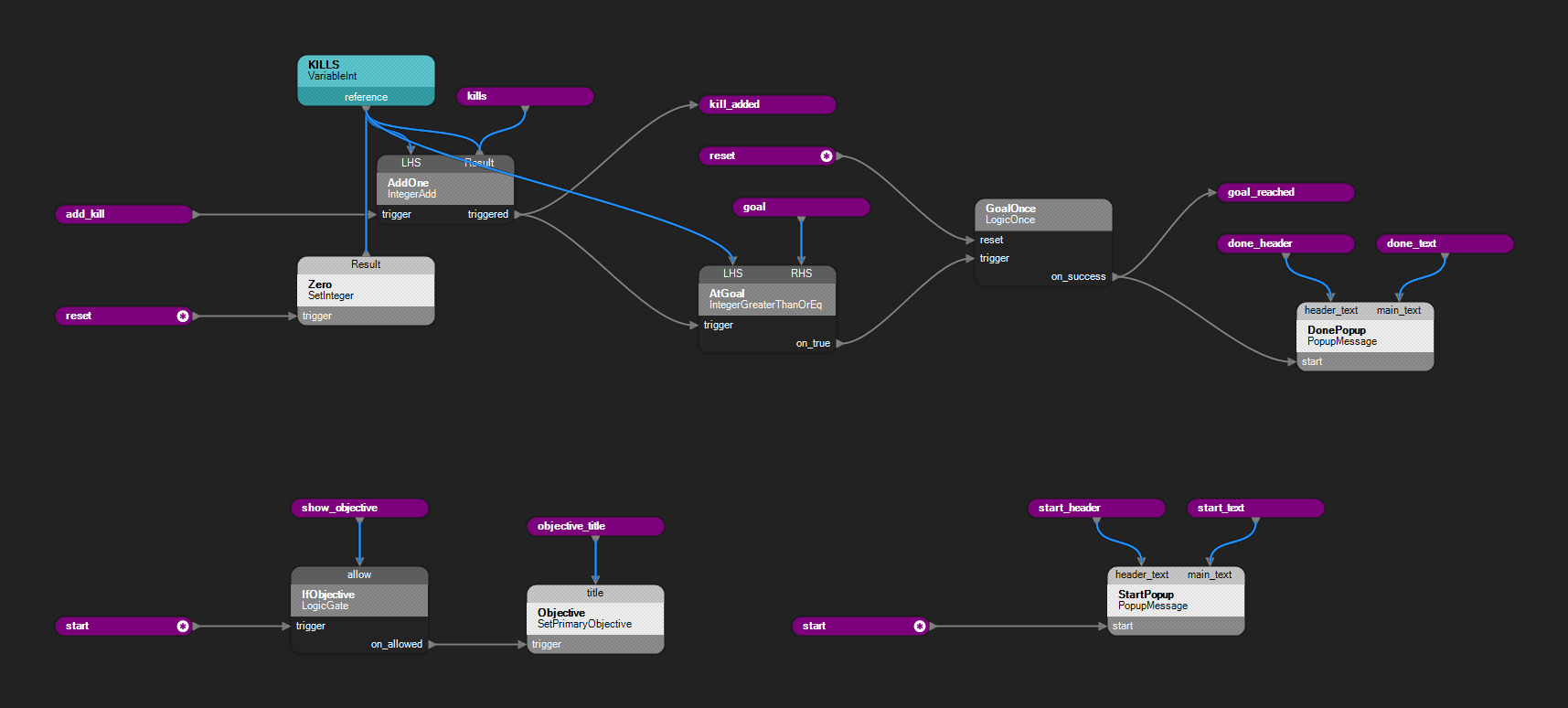
Open any prefab's composite to see how it works - this is the Kill Counter's page.
Kills the player the moment they step into a box - water, a pit, a long fall - with the game's normal death screen and checkpoint menu, the way the game's own levels kill the player. enable / disable switch it (it starts on); player_entered and killed_player fire as it happens. Set the box size when inserting it (the default box is 4 x 2 x 4 m).
The trap it avoids: the game stands a trigger box on its position: the position is the floor of the box, which reaches up twice its half height, and it catches the player's feet up to about 10 cm above its top. Put the kill volume's position at the bottom of the pit or under the water line. Only the player sets off a player trigger box: NPCs and props never do.
A small arena that is a complete game mode:
killed to the Kill Counter's add_kill, set its goal, and link your level-start trigger to its start.character to one spawner's npc_reference, and that spawner's finished_spawning to the Hunter's start: there is always one enemy coming for the player.goal_reached to what comes next - stop the spawners (respawn_off), a cut scene, the next objective.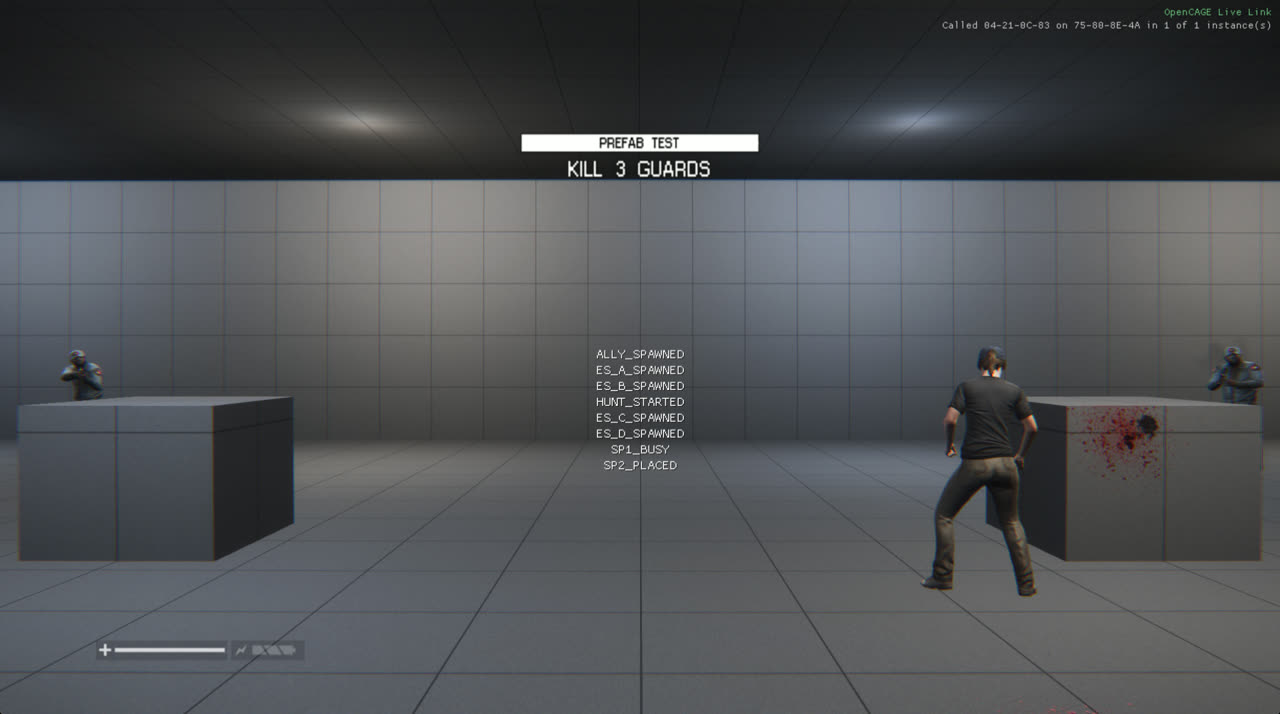
A test room made with Create Level and these prefabs: the Kill Counter's start popup, security guards from Enemy Spawners in cover, and the Ally fighting them. Its NPCs were brought in from the install when the prefabs were inserted.
Any composite package is a prefab. Build a composite, export it with File → Export Composites → To Disk into the Prefabs folder (Open Prefab Folder in the Insert Prefab window takes you there), and it appears in the list under My prefabs, with the name and description you gave the package. Packages in a subfolder of Prefabs are listed too.
Give it clear pins (method pins in, output pins out, input values for its settings). A package carries everything its composites use, the game's own NPCs included - which can make it large. The prefabs that come with OpenCAGE leave the game's NPCs out and bring them in from your install instead (see Character and Box Size).
An AI assistant connected to OpenCAGE lists the library with list_prefabs (each prefab's description, pins, trap, and whether the open level has it) and places one with place_prefab: where, its name, values for its input pins, a character (a spawn_npc kind such as android, or an archetype path) and a box_half_dimensions for the kill volume. It then links the pins with add_links.
