Some of what a level needs from the game isn't in the level at all: how much memory the game keeps for textures, whether characters bump into each other, and which movies play while the level loads are all set for the whole game. Change them by hand and every other level - the main campaign and other people's mods included - changes with them.
Level Launch Settings let a level state them for itself. They are kept with the level, so a mod made from it carries them, and they are used only when the game is launched into that level from OpenCAGE (Launch Game, or Launch Mod for a mod's players). Once the game closes, the game's own settings come back, so every other level, and the game started any other way, run exactly as they ship.
Open View → Level Config → Level Launch Settings for the level you have open. Change what the level needs, and click Save. The settings are used from the next launch into the level; a game launched before keeps what it started with.
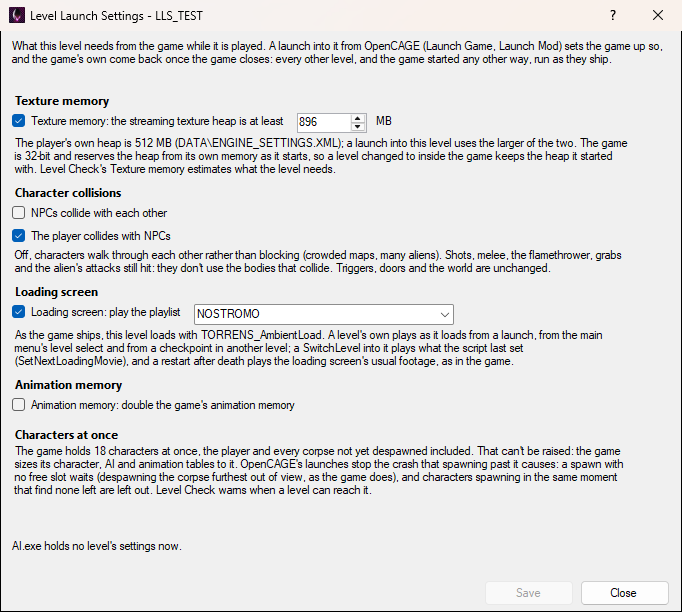
A level asking for a bigger texture heap, NPCs that walk through each other and the Nostromo's loading movies.
The line at the bottom says what the game is set up with right now: a level's settings stay in while the game launched into it runs, and come out again once it closes.
The game streams full-size textures into a fixed amount of memory, its streaming texture heap. Textures that don't fit are drawn from their small 128 pixel copies, which look blurry and blocky. The heap is set in the game's DATA\ENGINE_SETTINGS.XML (300 MB as the game ships) and used by every level, so raising it there for one big level raises it for all of them.
Tick Texture memory and give the size the level needs. A launch into the level gives the game a heap of at least that size - the larger of the level's value and the player's own - and every other level keeps the player's. Level Check's Texture memory check estimates what a level needs, and offers to set it.
The game is 32-bit, and reserves the heap from its own memory as it starts: keep it as small as the level allows (up to 1024 MB can be set; past 896 MB, test the level in game). For the same reason the heap is fixed once the game is running: a level the game moves on to with a SwitchLevel keeps the heap the game was launched with.
The streaming system also has a fixed number of texture slots (1024): a level that streams more textures than that at once draws the rest blocky whatever the heap. Level Check's Texture slots check counts them, and keeping small textures loaded frees slots.
Characters normally block each other: two NPCs can't stand in the same place, and the player can't walk through an NPC. In a cramped level with many characters - several aliens in narrow corridors, say - that can leave them stuck on each other.
Only the bodies characters move with stop colliding. Shots, melee, the flamethrower, grabs and the alien's attacks still hit, as they use the characters' own hit shapes; the world, doors, triggers, lockers and ragdolls are unchanged, and NPCs still steer around each other as they walk.
As a level loads, the game plays a playlist of loading movies chosen from a list built into the game: each campaign level has its own, and any other level gets Torrens'. Scripts can pick another one for the next load with a SetNextLoadingMovie entity, before a SwitchLevel.
Tick Loading screen and pick a playlist for the level: any movie or image playlist in the game's DATA\GBL_ITEM.BML. The window lists them, and the line under it says which one the level plays as the game ships. It plays as the level loads:
A SwitchLevel into the level plays what the script last chose with SetNextLoadingMovie, as the game does, and a restart after death plays the loading screen's usual footage, as in the game. While the level's settings are in, any other level the game doesn't name gets the same playlist.
A playlist name the game's list doesn't have is at most 25 characters. Whatever a playlist's own settings say, the game stops it once the level has loaded (after at least five seconds of the movie playing).
A level can also carry its own loading movies. Tick Loading screen: play the level's own movies, click Add and pick a .usm file (the CRI Sofdec video the game plays; Scaleform's video encoder and CRI's Sofdec encoder make them). The movie is copied into the level's folder, as DATA\ENV\PRODUCTION\MY_LEVEL\MOVIES\MY_MOVIE.USM, and plays in the order of the list. Up to eight can be listed.
By default the movies loop until the level has loaded, as the game's own loading footage does. Tick Play them to the end for an intro: the level waits until the last movie has finished, and once the level has loaded the player can hold a button to skip.
The game's own loading screen always stops its movies once the level has loaded, whatever a playlist's settings say, so to play them to the end the launch also changes the loading screen slightly, for that launch only: a playlist that doesn't loop holds the screen until its last movie ends, and the tip box no longer shows over loading movies. It comes out with the rest once the game closes. With Launch Game's Quicker Loadscreen on, no loading movies show at all: its loading screen has none (a level's own loading screen, from Level UI Overrides, goes over it).
Launching into the level copies the movies in with the game's own, adds a playlist of them to DATA\GBL_ITEM.BML and plays it as the level loads. Once the game closes, the copies and the playlist are taken out again, and GBL_ITEM.BML goes back to exactly what it was. Because the movies live in the level's folder, a mod made from the level carries them, and the Mod Manager never counts the launch's copies or playlist as a change of yours.
Remove takes a movie off the list but leaves its file in the level's MOVIES folder; the window warns about any file there that isn't listed, as a mod made from the level carries it anyway. Delete the file to leave it out.
To have movies play for many levels, or for levels loaded without OpenCAGE, give them a playlist of the game's own instead: put them in DATA\UI\MOVIES and list them with Loadscreen Movies, or in a GBL_ITEM.BML your mod carries.
A character only spawns once its animation set's clips fit in the game's animation memory beside every other set in use; one that doesn't fit never spawns, without an error. Levels with custom animation sets or new animation contexts may need more. Tick Animation memory and launches into the level double it, as Launch Game's Allow larger animation memory does for every level; every other level keeps the player's own choice.
The game holds 18 characters at once: the player, every NPC and alien, and every corpse that hasn't been despawned yet. That number can't be raised - the game sizes its character, AI and animation tables to it.
Past it, the game crashes: a spawn checks for a free slot without keeping it, so characters spawning at the same time can all take the last one. OpenCAGE's launches stop that, for every level:
So a level can't crash on too many characters any more, but it shouldn't rely on that: keep what spawns at once within 18, and spawn the rest as others are despawned.
Level Check's Character cap check warns when a level can have more than 18 characters at once.
A level's settings are kept in its own folder, as LAUNCH_SETTINGS.JSON: DATA\ENV\PRODUCTION\MY_LEVEL\LAUNCH_SETTINGS.JSON, or DATA\ENV\MY_LEVEL\LAUNCH_SETTINGS.JSON for a level made with Create Level. A level using the game's own settings has no file. Because the file lives with the level, a mod made from the level carries it, and its players get it when they install the mod.
Launching into the level sets the game's executable up as the settings say, the same way Launch Game's own options do. Once the game has closed (or anything else is launched, or OpenCAGE starts again after closing first), the game's own come back. The Steam, GOG and Epic versions of the game are all supported.
get_level_launch_settings (toolset game) - a level's settings (texture_heap_mb, npc_collisions, player_npc_collisions, loading_playlist, loading_movies and loading_movies_to_end, larger_animation_memory, and game_playlist, the playlist it plays as the game ships), the files in the level's MOVIES folder (movie_files), what the game is set up with now (in_use, with loading_screen_changed while movies play to the end), and how the character limit is handled; list_playlists lists the playlists the game has.set_level_launch_settings - change any of them (only the arguments given change; texture_heap_mb 0 and loading_playlist "" go back to the game's own; loading_movies takes absolute paths to .usm files, copied into the level's MOVIES folder, or names of files already there, and [] for none); dry_run checks without writing.launch_game and launch_mod use them, and list what went in as launch_settings.