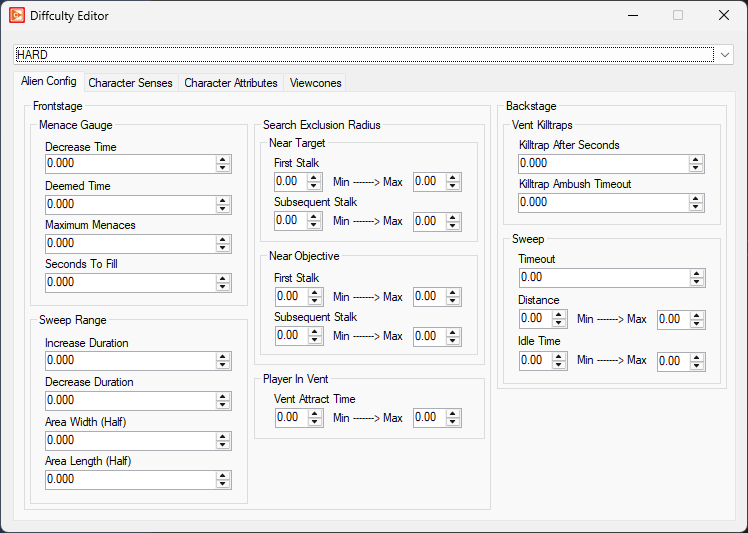
To edit difficulty settings in OpenCAGE navigate to View > Configuration Editors > Core Game > Difficulty Settings.
From here you will be presented with a variety of modifiers applied to various game systems depending on the difficulty level selected in-game, including alien configs, character senses, character attributes, and viewcones.
Pick a difficulty from the dropdown at the top of the window. Its modifiers are on four tabs: Alien Config, Character Senses, Character Attributes and Viewcones. The Character Senses and Character Attributes tabs each have a dropdown for the character type, and the Viewcones tab has one for the viewcone set.
There is no Save button: changes are saved as you make them. A difficulty's file can name another difficulty as its template. Where the selected difficulty doesn't set a value itself, the editor shows the value from its template. When the editor opens it saves every difficulty, writing the values each one inherits into its own file. A box with no value in the difficulty or any of its templates is greyed out and isn't saved.
The game reads these settings when it starts, not when it loads a level, so a change reaches it the next time it starts. With Live Link connected, and the game started with the Debug Menu on, each change also has the running game read the settings again, and every character takes them up straight away (the difficulty you're playing stays as it is), as the line at the bottom of the editor says.
Read on to see a list of available properties with information about each.
Decrease Time
float
Minimum: -1000
Maximum: 1000
Deemed Time
float
Minimum: -1000
Maximum: 1000
Maximum Menaces
float
Minimum: -1000
Maximum: 1000
Seconds To Fill
float
Minimum: -1000
Maximum: 1000
Increase Duration
float
Minimum: -1000
Maximum: 1000
Decrease Duration
float
Minimum: -1000
Maximum: 1000
Area Width (Half)
float
Minimum: -1000
Maximum: 1000
Area Length (Half)
float
Minimum: -1000
Maximum: 1000
First Stalk
float
Minimum: -1000
Maximum: 1000
Subsequent Stalk
float
Minimum: -1000
Maximum: 1000
First Stalk
float
Minimum: -1000
Maximum: 1000
Subsequent Stalk
float
Minimum: -1000
Maximum: 1000
Vent Attract Time
float
Minimum: -300
Maximum: 300
Killtrap After Seconds
float
Minimum: -1000
Maximum: 1000
Killtrap Ambush Timeout
float
Minimum: -1000
Maximum: 1000
Timeout
float
Minimum: -1000
Maximum: 1000
Distance
float
Minimum: -1000
Maximum: 1000
Idle Time
float
Minimum: -1000
Maximum: 1000
Activation Modifier
float
Minimum: -1000
Maximum: 1000
Combined Sense Activation Modifier
float
Minimum: -1000
Maximum: 1000
Activation Modifier
float
Minimum: -1000
Maximum: 1000
Combined Sense Activation Modifier
float
Minimum: -1000
Maximum: 1000
Activation Modifier
float
Minimum: -1000
Maximum: 1000
Combined Sense Activation Modifier
float
Minimum: -1000
Maximum: 1000
Activation Modifier
float
Minimum: -1000
Maximum: 1000
Combined Sense Activation Modifier
float
Minimum: -1000
Maximum: 1000
Max Hearing Distance Modifier
float
Minimum: -1000
Maximum: 1000
Damage Received Scalar
float
Minimum: 0
Maximum: 1000
Damage Dealt Scalar
float
Minimum: 0
Maximum: 1000
Suspicious Item Loop Scalar
float
Minimum: 0
Maximum: 1000
Time Between Shots Scalar
float
Minimum: 0
Maximum: 1000
Shooting In Cover Duration Modifier
float
Minimum: 0
Maximum: 1000
Melee Attack Interval
float
Minimum: 0
Maximum: 1000
Exposure Effect Modifier
float
Minimum: -1000
Maximum: 1000
Visual Stance Effect Modifier
float
Minimum: -1000
Maximum: 1000
