To edit character viewcones in OpenCAGE navigate to View > Configuration Editors > Core Game > Viewcones.
From here you will be presented with a variety of options which apply to the selected viewcone type in the dropdown at the top of the window.
Viewcones are used to define the areas that enemies can spot targets within. If a target enters an enemy's viewcone, various modifiers are used to calculate a visibility score.
Each viewcone type has a number of individual cone definitions within it (usually 'Focused', 'Close', 'Normal', and 'Peripheral') which are all queried to determine if a target is spotted or not. Typically larger cones will have lower visibility modifiers to give the illusion of further targets being harder to see.
To apply a viewcone type to a character, check out the sense editor.
Read on to see a list of available properties with information about each.
Note that a lot of these values are additionally increased/decreased by the current game difficulty config.
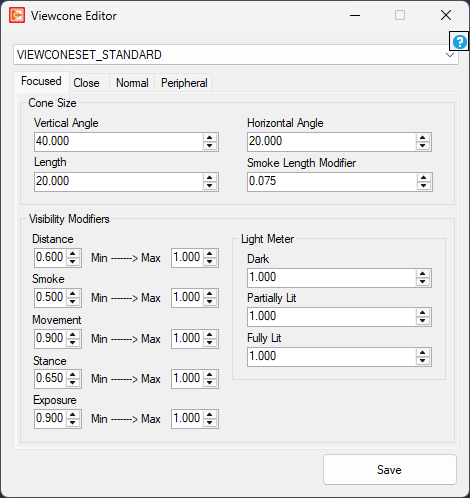
Vertical Angle
float
Minimum: 1
Maximum: 179
Horizontal Angle
float
Minimum: 1
Maximum: 179
Length
float
Minimum: 0.2
Maximum: 200
Smoke Length Modifier
float
Minimum: 0
Maximum: 1
Distance
float
Minimum: 0
Maximum: 1
Smoke
float
Minimum: 0
Maximum: 1
Movement
float
Minimum: 0
Maximum: 1
Stance
float
Minimum: 0
Maximum: 1
Exposure
float
Minimum: 0
Maximum: 1
To learn more about the light meter, check out the global constants editor.
Dark
float
Minimum: 0
Maximum: 1
Partially Lit
float
Minimum: 0
Maximum: 1
Fully Lit
float
Minimum: 0
Maximum: 1
