Alien Configs

To edit alien configs in OpenCAGE, navigate to Edit > Configurations > Characters > Alien Configs.

From here you will be presented with a variety of options which relate to the selected alien config in the dropdown at the top of the window.

Read on to see a list of available properties with information about each.

By default, the alien runs the 'MODERATE' config. This is can be changed at runtime through the script entity NPC_AlienConfig by providing the appropriate config name.

Note that a lot of these values are additionally increased/decreased by the current game difficulty config.
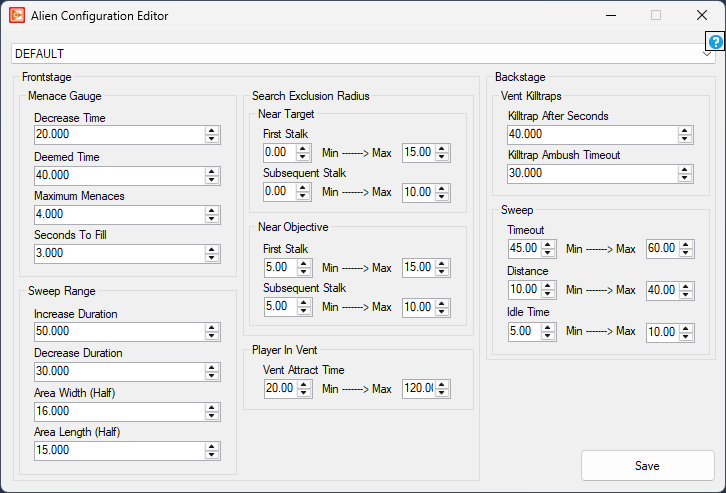
Frontstage

The alien is defined as 'frontstage' when it is out of the ceiling vents and within the player's playspace.

Menace Gauge

The menace gauge is an internal metric kept by the alien to prevent it hanging around the player too long.

  • Decrease Time float Minimum: 0 Maximum: 1000
    • Defines the time that the gauge takes to fully decrease to empty from full if no new menaces occur.
  • Deemed Time float Minimum: 0 Maximum: 1000
    • Defines the time before a menace is counted if the alien is trying to create one and it doesn't occur.
  • Maximum Menaces float Minimum: 1 Maximum: 10
    • Defines the maximum number of menaces before the alien goes backstage.
  • Seconds To Fill float Minimum: 0.1 Maximum: 50
    • Defines the seconds it takes to fill the gauge while at max menace.

Search Exclusion Radius

Near Target

  • First Stalk float Minimum: 0 Maximum: 1000
    • Defines how near/far to the target the alien can get on the first stalk, when menacing.
  • Subsequent Stalk float Minimum: 0 Maximum: 1000
    • Defines how near/far to the target the alien can get on subsequent stalks, when menacing.

Near Objective

  • First Stalk float Minimum: 0 Maximum: 1000
    • Defines how near/far to the objective the alien can get on the first stalk, when menacing.
  • Subsequent Stalk float Minimum: 0 Maximum: 1000
    • Defines how near/far to the objective the alien can get on subsequent stalks, when menacing.

Player In Vent

  • Vent Attract Time float Minimum: 20 (min) 30 (max) Maximum: 300
    • Defines the minimum and maximum time the alien will allow you to stay in a vent before coming for you.

Sweep Range

  • Increase Duration float Minimum: 5 Maximum: 10000
    • Defines how long it takes for the alien to go from far away from target to close in.
  • Decrease Duration float Minimum: 5 Maximum: 10000
    • Defines how long it takes for the alien to go from near to target to far away.
  • Area Width (Half) float Minimum: 5 Maximum: 100
    • Defines half the width of the box that sweep jobs for the alien can operate within.
  • Area Length (Half) float Minimum: 5 Maximum: 100
    • Defines half the length of the box that sweep jobs for the alien can operate within.

Backstage

The alien is defined as 'backstage' when it is up in the ceiling vents.

Vent Killtraps

  • Killtrap After Seconds float Minimum: -1 Maximum: 10000
    • After being backstage for this amount of time, the alien will start an attempt to killtrap you (-1 is infinite).
  • Killtrap Ambush Timeout float Minimum: -1 Maximum: 10000
    • This defines how long to wait while trying to ambush the player in a killtrap before giving up (-1 is infinite).

Sweep

  • Timeout float Minimum: -1 Maximum: 10000
    • This defines the timeout for the backstage stalk behaviour tree action (-1 is infinite).
  • Distance float Minimum: -1 Maximum: 10000
    • This defines the minimum and maximum distance to sweep backstage in relation to the player (-1 is infinite).
  • Idle Time float Minimum: 1 Maximum: 10000
    • This defines the minimum and maximum amount of time the alien will pause for before moving when backstage.