Character Attributes

To edit character attributes in OpenCAGE navigate to Edit > Configurations > Characters > Attributes.

From here you will be presented with a variety of attributes for the selected character.

Note that these configuration configs are generic between all characters, but some values are only used by certain character types.

Read on to see a list of available properties with information about each.
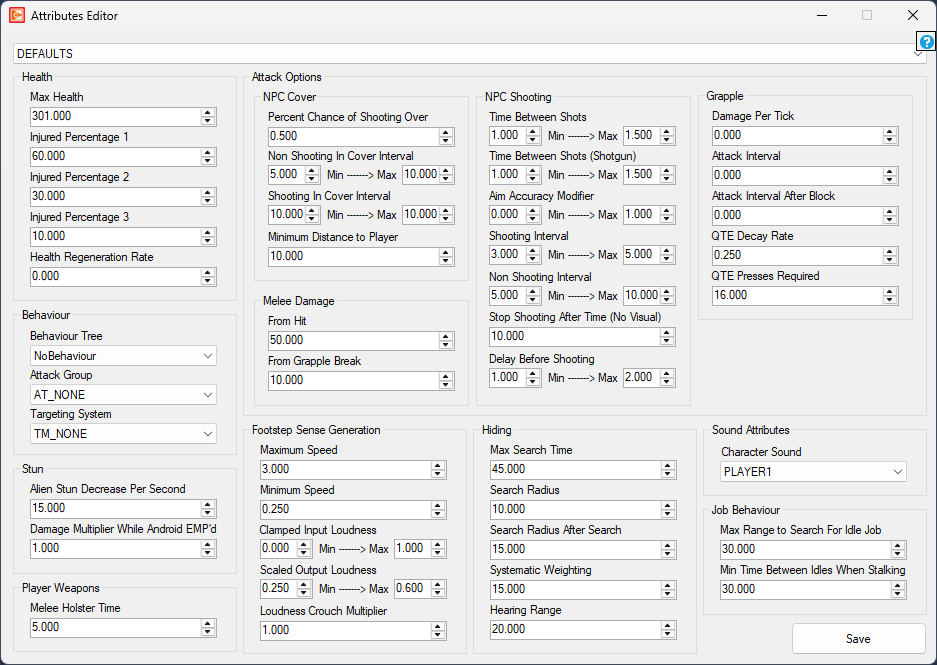
Health

  • Max Health int32 Minimum: 1 Maximum: 16000
    • Defines the maximum health of the character.
  • Injured Percentage 1 int32 Minimum: 0 Maximum: 100
    • Defines the percentage of health to mark the character as minorly injured - this is largely unused.
  • Injured Percentage 2 int32 Minimum: 0 Maximum: 100
    • Defines the percentage of health to mark the character as moderately injured - this is largely unused.
  • Injured Percentage 3 int32 Minimum: 0 Maximum: 100
    • Defines the percentage of health to mark the character as severely injured - this is largely unused.
  • Health Regeneration Rate int32 Minimum: 0 Maximum: 16000
    • Defines the rate at which health regenerates over time.

Behaviour

  • Behaviour Tree combobox
    • Defines the behaviour tree to use for the character. If the spawning Character entity has 'is_player' checked the tree will override to 'PlayerBehaviour'.
  • Attack Group combobox
    • If the character is an android this supports changing the attack configuration, but only between AT_ANDROID, AT_FHUGGER, or AT_HUMAN.
  • Targeting System combobox
    • Defines the internal systems to use for the character's behaviour. For example, TM_ALIEN will start up the menace gauge.

Stun

  • Alien Stun Decrease Per Second float Minimum: 0 Maximum: 1000
    • Defines how much the alien's stun gauge decreases per second.
  • Damage Multiplier While Android EMP'd float Minimum: 1 Maximum: 10
    • Defines a multiplier to the damage that androids take while stunned from an EMP.

Player Weapons

  • Melee Holster Time float Minimum: 0 Maximum: 1000
    • Defines how long it takes to holster the melee weapon after using it.

Attack Options

NPC Cover

  • Percent Chance of Shooting Over float Minimum: 0 Maximum: 1
    • Defines the percentage chance of shooting when in cover vs peeking out.
  • Non Shooting In Cover Interval float Minimum: (min) 0 (max) 0.5 Maximum: 20
    • Defines the minimum and maximum time spent in cover not shooting at the target, if the character has one and ammo.
  • Shooting In Cover Interval float Minimum: 0.5 Maximum: 20
    • Defines the minimum and maximum time the character will spend shooting if it has ammo and a target while in cover.
  • Minimum Distance to Player float Minimum: 0.1 Maximum: 100
    • Defines the minimum distance to the player when picking a cover spot.

Melee Damage

  • From Hit int32 Minimum: 1 Maximum: 5000
    • Defines the damage done by melee hit attacks.
  • From Grapple Break int32 Minimum: 1 Maximum: 5000
    • Defines the damage done when breaking out of an android grapple QTE.

NPC Shooting

  • Time Between Shots float Minimum: 0.1 Maximum: 20
    • Defines the minimum and maximum time time between shots fired.
  • Time Between Shots (Shotgun) float Minimum: 0.1 Maximum: 20
    • Defines the minimum and maximum time between shots fired when using a shotgun.
  • Aim Accuracy Modifier float Minimum: 0 Maximum: 1
    • Defines the normalised minimum and maximum accuracy modifier for the character, applied on top of the accuracy set by the ammo type.
  • Shooting Interval float Minimum: (min) 0 (max) 0.5 Maximum: 20
    • Defines the minimum and maximum time the character tries to shoot for as long as it has ammo and a target.
  • Non Shooting Interval float Minimum: (min) 0 (max) 0.5 Maximum: 20
    • Defines the minimum and maximum time spent not shooting at the target, if the character has one and ammo.
  • Stop Shooting After Time (No Visual) float Minimum: 0.1 Maximum: 100
    • Defines the time before the character stops shooting if it has no visual contact with the target.
  • Delay Before Shooting float Minimum: (min) 0 (max) 0.1 Maximum: 10
    • Defines the minimum and maximum delay before shooting at a target.

Grapple

  • Damage Per Tick int32 Minimum: 0 Maximum: 5000
    • Defines the grapple damage done per tick by androids.
  • Attack Interval float Minimum: 0 Maximum: 20
    • Defines the minimum interval between android grapple attacks.
  • Attack Interval After Block float Minimum: 0 Maximum: 20
    • Defines the minimum interval between android grapple attacks if the previous attack was blocked.
  • QTE Decay Rate float Minimum: 0 Maximum: 1
    • Defines the number of seconds it takes for one button press to be discounted from the android grapple QTE.
  • QTE Presses Required int32 Minimum: 1 Maximum: 30
    • Defines then number of button presses required to break free from an android grapple, excluding those discounted by 'QTE Decay Rate'.

Footstep Sense Generation

These settings define how loud the character's footsteps are to other NPCs. This is an internal sense metric, not the audio volume output by the game.

  • Maximum Speed float Minimum: 0 Maximum: 30
    • Defines the speed that maxes out the 'loudness' of the character's footsteps based on the character's velocity.
  • Minimum Speed float Minimum: 0 Maximum: 30
    • Defines the minimum speed (based on the character's velocity) that the character must travel before any footstep sound is generated.
  • Clamped Input Loudness float Minimum: 0 Maximum: 1
    • Defines how loud footsteps are considered to other NPCs when the minimum/maximum speed threshold has been reached.
  • Scaled Output Loudness float Minimum: 0 Maximum: 1
    • Defines the minimum/maximum final footstep sense 'loudness' value generated for other NPCs to detect.
  • Loudness Crouch Multiplier float Minimum: 0 Maximum: 1
    • Defines a multiplier applied to foosteps sounds if the character is in a crouched state.

Hiding

  • Max Search Time float
    • Defines the maximum time the alien can spend searching around the player whilst hiding.
  • Search Radius float
    • Defines the base radius to keep away from the target while performing a systematic search.
  • Search Radius After Search float
    • Defines the radius to keep away from the target while performing a systematic search, after a previous has finished.
  • Systematic Weighting float
    • Defines a modifier to the weighting for the systematic search job, useful to nudge towards the player whilst they are hiding.
  • Hearing Range float Minimum: 0 Maximum: 50
    • Defines how far away NPCs need to be to be informed that the player has entered a state of hiding.

Sound Attributes

  • Character Sound combobox
    • Defines the sound category argument to be passed to Wwise specifying the character type.

Job Behaviour

  • Max Range to Search For Idle Job float Minimum: 0 Maximum: 200
    • Defines the maximum range a character will search to find an idle job.
  • Min Time Between Idles When Stalking float Minimum: 0 Maximum: 200
    • Defines the minimum time between idle jobs while the alien is in the stalking state.