To edit inventory items in OpenCAGE, navigate to View > Configuration Editors > Inventory > Inventory Items.
From here you will be presented with a list of each inventory item in the game. Select one in the list to view the associated parameters.
Read on to see a list of available properties with information about each.
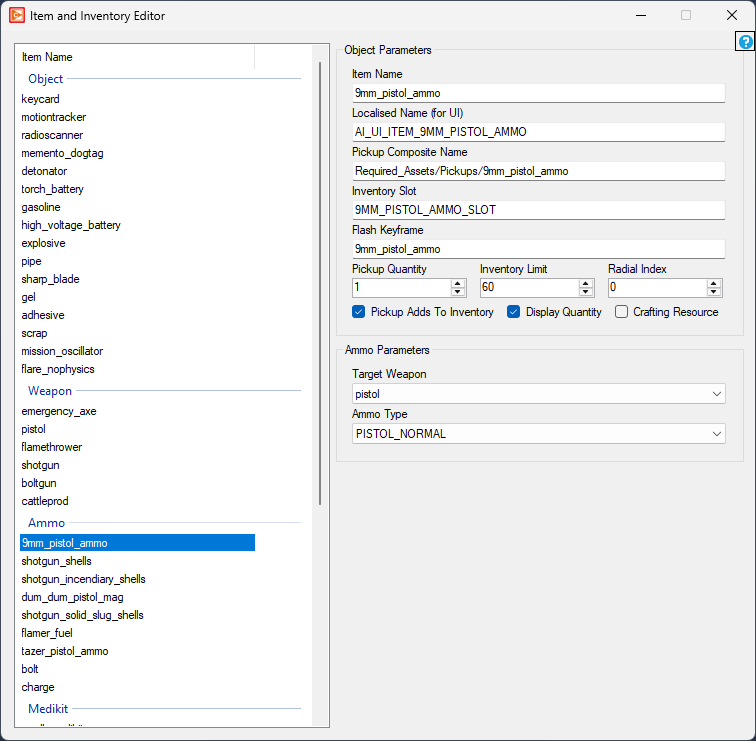
Item Name
string
Localised Name (for UI)
string
Pickup Composite Name
string
Inventory Slot
string
Flash Keyframe
string
Pickup Quantity
int32
Inventory Limit
int32
Radial Index
int32
Pickup Adds To Inventory
bool
Display Quantity
bool
Crafting Resource
bool
Target Weapon
combobox
Ammo Type
combobox
Weapon Type
combobox
Held Composite Name
string
Thrown Composite Name
string
Droppable When Held
bool
Drop When Consumed
bool
Consumed When
combobox
Activated By
combobox
Can Cancel Activation Before (seconds)
float
Health Increase %
int
Health Increase % (when upgraded)
int
