Ammo

To edit ammo configurations in OpenCAGE navigate to Edit > Configurations > Inventory > Ammo.

From here you will be presented with a variety of options which relate to the selected ammo type in the dropdown at the top of the window.

Read on to see a list of available properties with information about each.
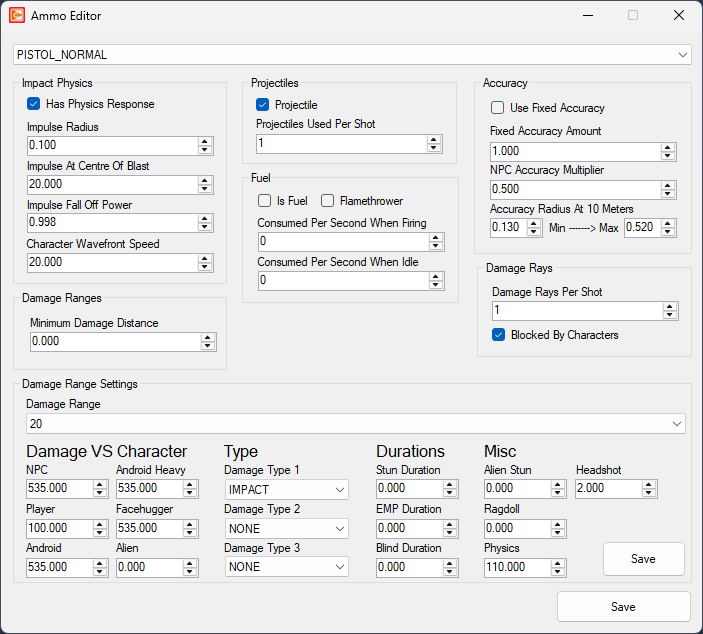
Impact Physics

  • Has Physics Response bool
    • Check this to enable physics responses to impacts.
  • Impulse Radius float Minimum: 0.1 Maximum: 1000
    • The impulse radius in metres.
  • Impuse At Centre Of Blast float Minimum: 1 Maximum: 1000
    • The impulse applied to an object at the centre of the blast.
  • Impulse Falloff Power float Minimum: 0 Maximum: 17
    • This modifies the impulse based on distance from centre.
  • Character Wavefront Speed float Minimum: 0.1 Maximum: 1000
    • The speed the wavefront of an explosion moves at, in meters per second.

Projectiles

  • Is Projectile bool
    • If this ammo type is a projectile - note this value may be overridden at runtime.
  • Projectile Used Per Shot int Maximum: 1000
    • If projectile, defines ammo depletion per shot - for example 7 damage rays for the shotgun may only use 2 ammo.

Fuel

  • Is Fuel bool
    • Check to mark the ammo type as fuel, and not the standard projectile.
  • Is Flamethrower bool
    • If this ammo type is used as for the flamethrower - note this value may be overridden at runtime.
  • Consumed Per Second When Firing int Maximum: 1000
    • If 'Is Fuel' is checked, defines the units consumed per second whilst firing.
  • Consumed Per Second WHen Idle int Maximum: 1000
    • If 'Is Fuel' is checked, defines the units consumed per second when not firing, but switched on.

Accuracy

  • Use Fixed Accuracy bool
    • If checked, the 'Fixed Accuracy' value is used at all times for the accuracy of the shot, otherwise accuracy is accumulated over time aiming.
  • Fixed Accuracy float Minimum: 0 Maximum: 1
    • The fixed accuracy value for the shot if 'Use Fixed Accuracy' is checked.
  • NPC Accuracy Multiplier float Minimum: 0 Maximum: 1
    • Multiply accuracy calculations for an NPC.
  • Base Aiming Accuracy Radius float Minimum: 0 Maximum: 10
    • Defines the minimum and maximum base aiming accuracy radius before any penalties.

Damage Rays

  • Damage Rays Per Shot int Maximum: 16
    • The number of damage giving rays per shot.
  • Blocked By Characters bool
    • Do damage rays stop after hitting a character? For example, more powerful ammo may want to pass through enemies.

Damage Ranges

  • Minimum Damage Distance float Minimum: 0 Maximum: 100
    • Defines how far an enemy must be from the source of firing before it has an effect.

Damage Range Settings

Select a 'Damage Range' to modify its properties. The impact will be effective up to this range (and from the previous range if appropriate).

Damage VS Character

  • NPC float Minimum: 0
    • Defines the damage done to any regular NPCs (not Aliens, Androids) at the given range.
  • Player float Minimum: 0
    • Defines the damage done to the player at the given range.
  • Android float Minimum: 0
    • Defines the damage done to Working Joes at the given range.
  • Android Heavy float Minimum: 0
    • Defines the damage done to Hazmat Joes at the given range.
  • Alien float Minimum: 0
    • Defines the damage done to the alien at the given range.
  • Facehugger float Minimum: 0
    • Defines the damage done to facehuggers at the given range.

Type

  • Damage Type 1 combobox
    • Damage type dealt by this ammo at the given range (one of a possible three types).
  • Damage Type 2 combobox
    • Damage type dealt by this ammo at the given range (one of a possible three types).
  • Damage Type 3 combobox
    • Damage type dealt by this ammo at the given range (one of a possible three types).

Durations

  • Stun Duration float Minimum: 0
    • Defines the duration for the applied stun to a hit character at the given range.
  • EMP Duration float Minimum: 0
    • Defines the duration for the applied EMP stun to a hit character at the given range.
  • Blind Duration float Minimum: 0
    • Defines the duration for the applied blind stun to a hit character at the given range.

Misc

  • Alien Stun float Minimum: 0
    • Defines the amount of stun damage to apply to the alien if hit.
  • Ragdoll float Minimum: 0
    • The impact force for ragdoll deaths. Set to zero to disable.
  • Physics Damage float Minimum: 0
    • Defines the damage done to physics objects at the given range.
  • Headshot float Minimum: 0 Maximum: 100
    • Defines the multiplier to any damage done if the character was hit in the head (excluding the alien).