To edit radiosity settings in OpenCAGE navigate to View > Configuration Editors > Core Game > Radiosity.
From here you can modify a variety of settings used by the game's realtime radiosity system to modify the look of the lighting.
Read on to see a list of available properties with information about each.
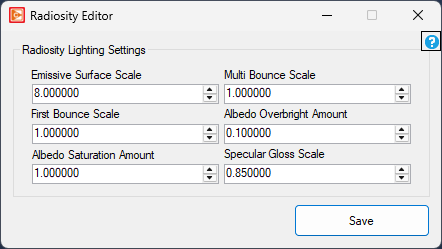
Emissive Surface Scale
float
Minimum: 0
Maximum: 64
Multi Bounce Scale
float
Minimum: 0
Maximum: 1
First Bounce Scale
float
Minimum: 0
Maximum: 1
Albedo Overbright Amount
float
Minimum: 0
Maximum: 1
Albedo Saturation Amount
float
Minimum: 0
Maximum: 4
Specular Gloss Scale
float
Minimum: 0
Maximum: 1
