To edit hair and skin shading in OpenCAGE navigate to View > Configuration Editors > Core Game > Hair and Skin Shading, as shown below. This opens the Hair and Skin Shading Editor.

Characters aren't shaded with the same model as the rest of the world. Skin uses subsurface scattering — light entering the surface, bouncing around under it, and leaving somewhere slightly different — and hair uses an anisotropic model that gives it two specular highlights rather than one. Both are driven by global settings rather than per-material ones, so a change here affects every character in the game.
The values are stored in DATA/SKIN_SHADING_SETTINGS.TXT and DATA/HAIR_SHADING_SETTINGS.TXT. Edits are written as soon as you change a field, so there's no save button — close the window when you're done. The game reads both files each time it loads a level; with Live Link connected, every change also shows in the running game as you make it, as the line at the bottom of the editor says. The whole editor is shown below: the two skin fields sit in the small group at the top and the twenty hair fields fill the larger group beneath it.
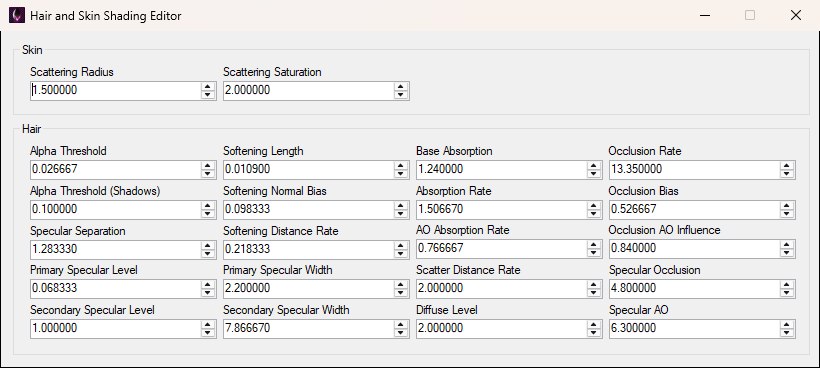
The editor as it opens on a stock install. Every setting is a numeric box, and values are written the moment you change them.
These are engine-wide rendering settings with no per-level override. To get back to stock values, open the Backup Manager, click Revert Configs, then Reset Hair and Skin Shading Settings. That overwrites both files with the vanilla ones and closes the game if it's running.
Two values control the subsurface scattering — they're the pair in the Skin group at the top of the editor:
Hair has considerably more to tune. The settings group loosely into transparency, highlights, absorption, occlusion, and softening. The window doesn't separate them that way — it lays all twenty out in a grid of four columns, pictured below — so find each field by its label.
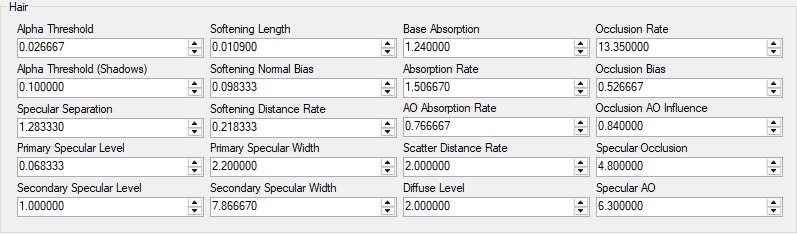
Anisotropic hair shading produces two specular highlights — a sharp one near the surface and a broader, coloured one from light that has passed through strands.
Hair edges are softened against whatever is behind them so individual strands don't alias badly.
These are all subtle and interdependent — change one thing at a time and look at a character in game before moving on.
