To edit locomotion settings in OpenCAGE navigate to View > Configuration Editors > Characters > Locomotion.
Select a character type from the dropdown at the top of the form to see the locomotion configurations associated with it.
Read on to see a list of available properties with information about each.
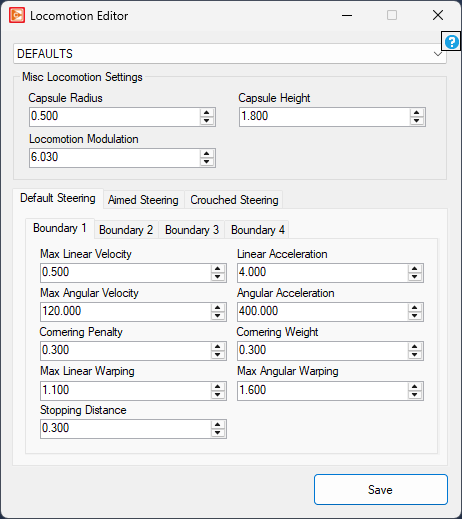
Capsule Radius
float
Minimum: 0.01
Maximum: 10.0
Capsule Height
float
Minimum: 0.01
Maximum: 20.0
Locomotion Modulation
float
Minimum: 0
Maximum: 1
There are three types of steering boundary; default, aimed, and crouched. These are applied based on the character's state.
Within each type there are four possible boundary configurations. At runtime these are sorted by 'Max Linear Velocity' giving you slowest, slow, fast, fastest - able to be used in the scripting system via the LOCOMOTION_TARGET_SPEED enum.
Max Linear Velocity
float
Minimum: 0
Maximum: 100
Max Angular Velocity
float
Minimum: 0
Maximum: 1080
Cornering Penalty
float
Minimum: 0
Maximum: 1
Max Linear Warping
float
Minimum: 1
Maximum: 100
Stopping Distance
float
Minimum: 0
Maximum: 20
Linear Acceleration
float
Minimum: 0
Maximum: 100
Angular Acceleration
float
Minimum: 0
Maximum: 80000
Cornering Weight
float
Minimum: 0
Maximum: 1
Max Angular Warping
float
Minimum: 1
Maximum: 100
