To edit global constants in OpenCAGE navigate to View > Configuration Editors > Core Game > Global Constants.
From here you will be presented with a variety of options which apply across various core systems in the game.
Read on to see a list of available properties with information about each.
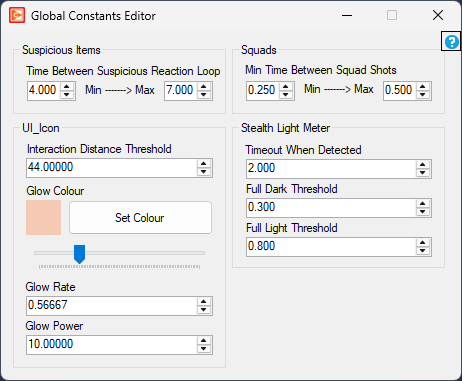
Min Time Between Squad Shots
float
Minimum: 0.1
Maximum: 10
Time Between Suspicious Reaction Loop
float
Minimum: 0.1
Maximum: 10
Interaction Distance Threshold
float
Minimum: 0
Maximum: 999
Glow Colour
colour
Glow Rate
float
Minimum: 0
Maximum: 10
Glow Power
float
Minimum: 0
Maximum: 10
The light meter is one of a variety of 'stealth' systems. Characters contain three sensors placed on the ground, hip, and head. An average luminance value is calculated based on these three points and checked against the thresholds defined below to determine the character's brightness - either dark, partially lit, or fully lit. This brightness is then used to determine the impact on the visbility threshold for enemies seeking the character, defined by the enemy's viewcone which contains the character.
Timeout When Detected
float
Minimum: 0
Maximum: 100
Full Dark Threshold
float
Minimum: 0
Maximum: 1
Full Light Threshold
float
Minimum: 0
Maximum: 1
