Reference for animation tree node types, parameters, and graph pins. For how to open and edit trees, see the Animation Tree Editor guide.
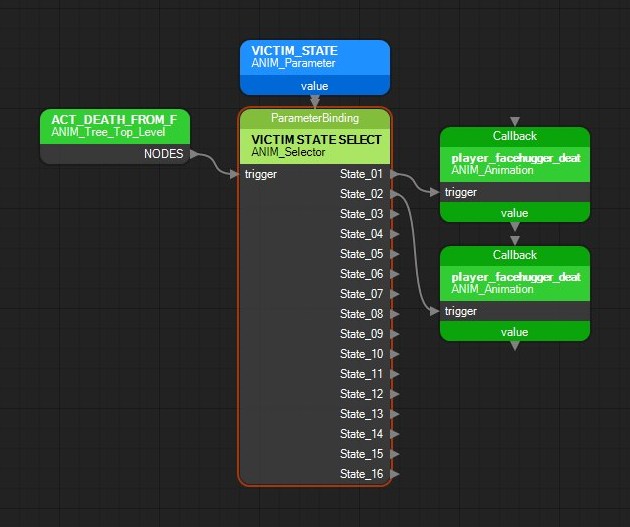
Pin sides: left = flow input, right = flow output(s), top = value/reference input, bottom = value output. Value wiring is provider value to consumer top pin. The canvas below shows all four sides on an ANIM_Selector: its trigger arrives on the left from the tree root's NODES output, an ANIM_Parameter's bottom value pin feeds ParameterBinding on the top, and each wired State_xx on the right leads to an ANIM_Animation leaf with its own top Callback and bottom value pins. Node headers are coloured by group: green for playback leaves and the tree root, blue for parameter and property providers, pale green for selectors, orange for parametrics, lilac for additive blends, purple for ANIM_Callback, red for ANIM_Metadata_Event_Listener, dark purple for the bilinear nodes and white for the rest.
A selector on the canvas (selected, hence the orange outline): left trigger from the root, top ParameterBinding from a parameter node, right State_01 and State_02 outputs to two animation leaves.
Root
Tree root node present in every animation tree.
ANIM_Tree_Top_Level
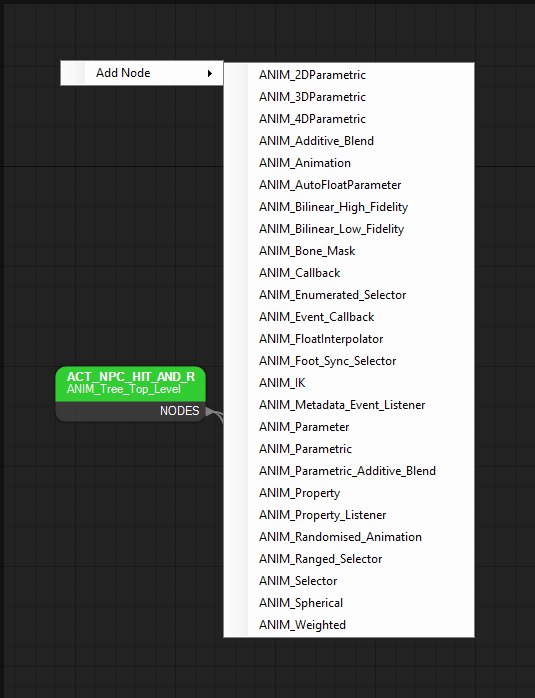
Root of an animation tree. Created with the tree - not available from the Add Node menu, which otherwise lists every type in this reference alphabetically. Right-click empty canvas to open it, as shown below.
Add Node lists every other type in this reference; the tree root is the one type it never offers.
Pins:
NODESflow output (right) -> child trigger
Parameters:
Namevariable: String
Setvariable: String
TreeEaseInTimevariable: floatdefault: 0.25
RemoveMotionExtractionOnEaseOutvariable: bool
RemoveMotionExtractionOnPrecedingvariable: bool
NeverUseMotionExtractionvariable: bool
AllowFootIkIfPrimaryvariable: bool
AllowHipLeanIkIfPrimaryvariable: bool
GaitSyncOnStartvariable: bool
UseLinearBlendvariable: bool
MinInitialPlayspeedvariable: float
MaxInitialPlayspeedvariable: float
Playback
Leaf nodes that play animation clips.
ANIM_Animation
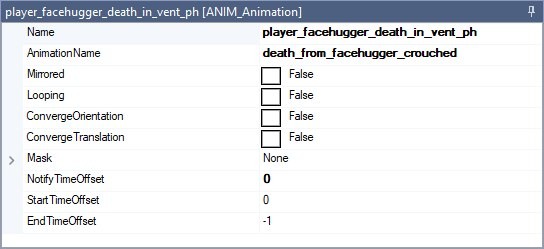
Plays a single named animation clip. Selecting one on the canvas fills the Node Properties panel with the parameters listed below; the panel caption gives the node name and type.
Node Properties for an ANIM_Animation leaf - the rows are this section's Parameters; the Callback link is a pin on the canvas, not a row.
Pins:
triggerflow input (left)
Callbackvalue input (top)
valuevalue output (bottom)
Parameters:
Namevariable: String
AnimationNamevariable: String
Loopingvariable: bool
Mirroredvariable: bool
Maskvariable: BoneMaskGroups
ConvergeOrientationvariable: bool
ConvergeTranslationvariable: bool
NotifyTimeOffsetvariable: float
StartTimeOffsetvariable: float
EndTimeOffsetvariable: float
ANIM_Randomised_Animation
Picks from a weighted pool of up to 8 animation entries.
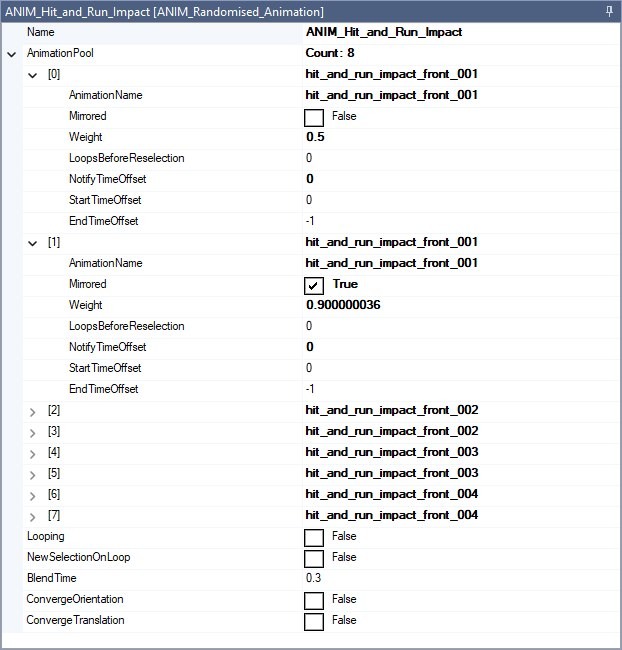
Each pool entry exposes AnimationName, Mirrored, Weight, LoopsBeforeReselection, and time offsets, edited by expanding AnimationPool in the Node Properties panel, as shown below; the panel lists all 8 slots, and a collapsed slot shows its clip name. Empty AnimationName slots are skipped on save.
AnimationPool on a randomised leaf: each of the 8 slots carries its own clip name, weight and offsets. Here slots 0 and 1 play the same clip, the second mirrored and weighted higher.
Pins:
triggerflow input (left)
Callbackvalue input (top)
RandomCallbackvalue input (top)
Parameters:
Namevariable: String
Loopingvariable: bool
NewSelectionOnLoopvariable: bool
BlendTimevariable: float
ConvergeOrientationvariable: bool
ConvergeTranslationvariable: bool
AnimationPoolvariable: Animation[8]
Parameters & Properties
Parameter and property providers / listeners.
ANIM_Parameter
Exposes a typed parameter value for other nodes to bind to.
Pins:
valuevalue output (bottom)
Parameters:
Namevariable: String
ParameterTypevariable: AnimTreeParameterType
ANIM_AutoFloatParameter
Auto float parameter node.
Pins:
valuevalue output (bottom)
Parameters:
Namevariable: String
ANIM_FloatInterpolator
Interpolates toward a source parameter at a fixed rate.
Pins:
SourceParametervalue input (top)
valuevalue output (bottom)
Parameters:
Namevariable: String
ParameterTypevariable: AnimTreeParameterType
InitialValuevariable: float
UnitsPerSecondvariable: float
ANIM_Property
Holds animation metadata / property value data.
Pins:
valuevalue output (bottom)
Parameters:
Namevariable: String
Valuevariable: AnimationMetadataValue
ANIM_Property_Listener
Listens to a named anim property on a linked leaf.
None: this node can't be wired into a tree on the canvas.
Parameters:
Namevariable: String
EventNamevariable: String
WeightThresholdvariable: float
FilterTimevariable: float
Selectors
Nodes that choose among child branches.
ANIM_Selector
Selects among up to 16 child states by discrete parameter value.
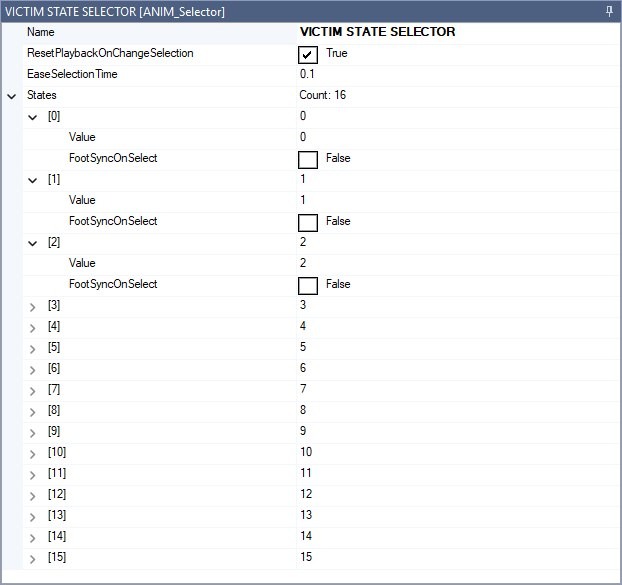
Each state has Value (uint), FootSyncOnSelect, and a linked child Node (via pin). Expand States in the Node Properties panel to edit the values, as shown below. The entries are numbered from 0 there, so [0] is pin State_01, and each state's child is whatever is wired to that State_xx output on the canvas.
States on an ANIM_Selector: all 16 entries are listed, the first three expanded here; a collapsed entry shows its Value.
Pins:
triggerflow input (left)
ParameterBindingvalue input (top)
State_01flow output (right)
State_02flow output (right)
State_03flow output (right)
State_04flow output (right)
State_05flow output (right)
State_06flow output (right)
State_07flow output (right)
State_08flow output (right)
State_09flow output (right)
State_10flow output (right)
State_11flow output (right)
State_12flow output (right)
State_13flow output (right)
State_14flow output (right)
State_15flow output (right)
State_16flow output (right)
Parameters:
Namevariable: String
EaseSelectionTimevariable: float
ResetPlaybackOnChangeSelectionvariable: bool
Statesvariable: SelectorState[16]
ANIM_Enumerated_Selector
Enumerated selector - same structure as ANIM_Selector with a different node type id.
Pins:
triggerflow input (left)
ParameterBindingvalue input (top)
State_01flow output (right)
State_02flow output (right)
State_03flow output (right)
State_04flow output (right)
State_05flow output (right)
State_06flow output (right)
State_07flow output (right)
State_08flow output (right)
State_09flow output (right)
State_10flow output (right)
State_11flow output (right)
State_12flow output (right)
State_13flow output (right)
State_14flow output (right)
State_15flow output (right)
State_16flow output (right)
Parameters:
Namevariable: String
EaseSelectionTimevariable: float
ResetPlaybackOnChangeSelectionvariable: bool
Statesvariable: SelectorState[16]
ANIM_Ranged_Selector
Selects among up to 8 child states by float parameter range.
Each state has Min, Max, FootSyncOnSelect, and a linked child Node.
Pins:
triggerflow input (left)
ParameterBindingvalue input (top)
State_01flow output (right)
State_02flow output (right)
State_03flow output (right)
State_04flow output (right)
State_05flow output (right)
State_06flow output (right)
State_07flow output (right)
State_08flow output (right)
Parameters:
Namevariable: String
EaseSelectionTimevariable: float
ResetPlaybackOnChangevariable: bool
Statesvariable: RangedSelectorState[8]
ANIM_Foot_Sync_Selector
Chooses left or right foot-strike child for gait sync.